1 · What is a Stream Deck?
The Elgato Stream Deck is a small USB keyboard with programmable LCD keys. Originally aimed at live streamers, but excellent for hypnosis sessions: tactile keys, easy to feel without looking, custom icons, colour-coded layouts.
Variants:
- Stream Deck Mini — 6 keys, a perfect fit for Hypnotika
- Stream Deck MK.2 — 15 keys, room for playlist favourites and tempo presets
- Stream Deck XL — 32 keys, for pro setups with multiple client profiles
2 · The easy way: our plugin (recommended)
Since version 0.2.0 there is a ready-made Hypnotika plugin for the Elgato software. It removes key-combination setup entirely: after installing, a category called „Hypnotika TranceDeck" appears in the Stream Deck software and you simply drag the actions onto your keys.
Ctrl+Alt+F2 silently becomes Ctrl+Alt+2, and the key later does nothing at all. With the plugin that cannot happen, because there are no key combinations. The plugin also does things hotkeys cannot: show the currently playing track live on a key, and control music volume from the dial of a Stream Deck Plus.
Requirements
- Elgato Stream Deck software 6.4 or newer
- Windows. There is no macOS build of Hypnotika yet, so no plugin for it either. On Linux the key-combination route (section 3) remains
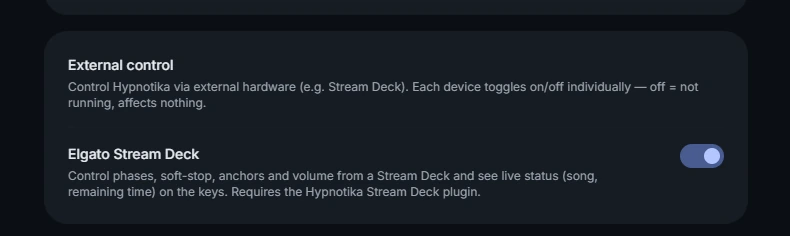
- Hypnotika must be running, and in Settings „External control" → „Stream Deck" must be switched on — this is what it looks like:
Hypnotika Stream Deck plugin (beta)
Ten ready-made actions, no key combinations. Windows, about 6 KB — a double-click installs it.
Download pluginInstallation in three steps
- Download the file (button above). It normally lands in your Downloads folder.
- Double-click the file. The Stream Deck software recognises it, asks once and installs the plugin itself. No unzipping, no copying into system folders, no restart.
- In Hypnotika: Settings → „External control" card → switch „Stream Deck" on (see the picture above).
The category „Hypnotika TranceDeck" then appears in the action list on the right. Drag actions onto keys — done.
hypnotika-streamdeck-plugin-0.1.0-beta from %APPDATA%\Elgato\StreamDeck\Plugins\.
The ten actions
| Action | What it does |
|---|---|
| Intro | Starts the intro phase |
| Middle | Switches to the middle phase |
| Climax | Switches to the climax phase |
| Outro | Switches to the outro phase |
| Soft-Stop | Fades the music out gently |
| Anchor 1–3 | Triggers the corresponding sound anchor |
| Status | Display-only key: shows the currently playing track and below it a countdown to the change. If the track is looping, a ⟳ precedes the time; if a change is queued, the key shows the next track with a ▸ |
| Volume | As a key (shows the value in percent) and on the dial of a Stream Deck Plus. One detent = 5 percentage points |
If something does not work
- Nothing happens when you double-click → the Stream Deck software is not running. Start it and double-click the file again.
- The „Hypnotika TranceDeck" category is missing from the action list → check under Settings → Plugins whether „Hypnotika TranceDeck" is listed. If it is not, the installation did not go through — double-click the file once more.
- Keys do not respond, the status key stays empty → Hypnotika is not running, or „External control → Stream Deck" is switched off.
- It worked before and does not now → check the switch again after a Hypnotika update.
Uninstalling: in the Stream Deck software go to Settings → Plugins, select „Hypnotika TranceDeck" and click the minus button. Nothing is left behind.
3 · Alternative: key combinations by hand
This is the route if you do not have an Elgato device — working with a Loupedeck, TourBox, MIDI pads, a foot pedal or simply your keyboard. It also works on Linux, where neither the Elgato software nor the plugin exists.
Open Settings → Stream Deck / macro controller and enable „Global hotkeys". Hypnotika then registers the six combinations system-wide — they work even when Hypnotika is in the background and Zoom is in front.
| Windows | Linux | Action |
|---|---|---|
Ctrl+Alt+F1 | Ctrl+Alt+1 | Intro phase |
Ctrl+Alt+F2 | Ctrl+Alt+2 | Swap track (different track, same phase) |
Ctrl+Alt+F3 | Ctrl+Alt+3 | Climax phase |
Ctrl+Alt+F4 | Ctrl+Alt+4 | Outro phase |
Ctrl+Alt+F5 | Ctrl+Alt+5 | Soft-Stop |
Ctrl+Alt+F6 | Ctrl+Alt+6 | Cancel queue |
Why different keys on Linux? There Ctrl+Alt+F1 to F6 switch to the system's text consoles — the shortcut would throw you out of the graphical session mid-appointment before Hypnotika ever sees the key.
Two things worth knowing
There is no global combination for the middle phase. It is reachable through the plugin or in the app itself.
The sound anchors sit on Q W E R T Z — anchors 1 to 6; on a QWERTY keyboard Y also triggers the sixth. These six are not global: they only fire while the Hypnotika window is in front. On a Stream Deck key they therefore only work when Hypnotika has focus — with Zoom in the foreground, nothing happens. To trigger anchors regardless, use the plugin from section 2.
Configuring the Stream Deck software
Download the Elgato Stream Deck software and start it. Your Stream Deck is detected automatically.
- Drag „System → Hotkey" from the right sidebar onto a free key. Not „Hotkey Switch" — that works too but confuses with a second assignment row.
- Click the „Hotkey" field below and press the combination you want.
- Give it a title: „Intro", „Climax" and so on.
- Assign an icon — from the built-in library or from our icon pack (section 4).
- Repeat for the remaining keys.
Ctrl+Alt+F2 silently becomes Ctrl+Alt+2, and the key later does nothing. From the outside the assignment looks perfectly fine, because the field reads „Ctrl + Alt + 2" — you have to know that it should say „F2".After each assignment, check that the field really says
F2 and not 2. If the digit is there: clear the field and press again. In one real case this left three out of four keys wrongly assigned.With the plugin from section 2 this cannot happen — there are no key combinations to misread.
4 · Icon pack for Hypnotika
Ten ready-made key images in one consistent style, dark background, readable from a metre away. As JPEG 144 × 144 — the format Elgato recommends in its own guides — plus PNG and editable SVG sources. With a sheet in the pack showing which icon belongs on which key.
Free to use, modify and include in your own guides or videos. No attribution required, no form.
Useful with the plugin too. The plugin brings its own actions, but it puts the same symbol on every key and tells them apart only by the label. If you want to distinguish the keys at a glance, drag these icons on as well — that works with the plugin exactly as it does without.
5 · Alternative hardware
You don't want to buy an Elgato product? The global hotkeys work with any device that can send programmable keystrokes:
- Loupedeck Live — touch display with rotary encoders, similar principle
- TourBox Neo — tactile knobs, very flat, for mobile setups
- MIDI pads (Akai MPD, Novation Launchpad) — use
Bome MIDI Translator ProorMIDIKey2Keyto map MIDI to key combinations - Programmable macro keyboards (e.g. from KeebMaker, DroppingFire) — under 30 €, open-source firmware
- Regular keyboard with labelled key stickers — works too, costs under 5 €